Showing posts with label iPhone. Show all posts

Friday, 31 July 2015

ApplePay anecdotes

So I almost ran into the AppleWatch ApplePay, ran out of battery fail at mignight on Wednesday.

However before I went through the barriers to the overground train I discovered my last train had gone. Between there and the tube my AppleWatch ran out of juice! Lucky I had not swiped in!

Therefore I had a chance to use ApplePay on the iPhone 6 Plus. I didn't realise the NFC field would activate it, so I opened Passbook and fiddled for a while, as I couldn't work out how to make the card ready.

So I just placed it on the contactless reader on the gate and put my finger on the scanner. It took a while and was rather cumbersome, but it did work, and on the other end too.

Love the AppleWatch ApplePay tibe/overground/tfl experience, but I shall be avoiding doing it on my phone whete possible.

Sunday, 24 August 2014

iPhone 6 predictions

Want I'd like to see;

  • Larger form factor & bigger screen
  • Better camera
  • Faster wireless mobile / cellular data capability
  • Enhancements to Siri
  • Better battery life
  • Faster processor / more memory / better graphics
  • Additional multitasking functionality / dual screen functionality
  • More reliable / robust / less buggy / lower failure rate
  • Beautiful new design
  • Smart bezel to have some interactivity with the bezel of the device with the screen
  • Larger choice in colour?
  • Better quality speakers / higher volume capability
  • Reversible USB / Lighting connection
  • Enhancements to the iBeacons technology / reliability / frequency reading capability
  • NFC capability to enable the digital wallet in your phone
Let's see how many of the items I get right!

Thursday, 26 September 2013

iOS 7 some of what I like about it

The lock screen now looks great, and really awesomeness you can access the notification centre and control centre right from the lock screen.


Slide across and you get the much more attractive unlock keyboard;


The new home screen looks fantastic, it took a little while to get used to, but it actually looks a lot better than it used to look.


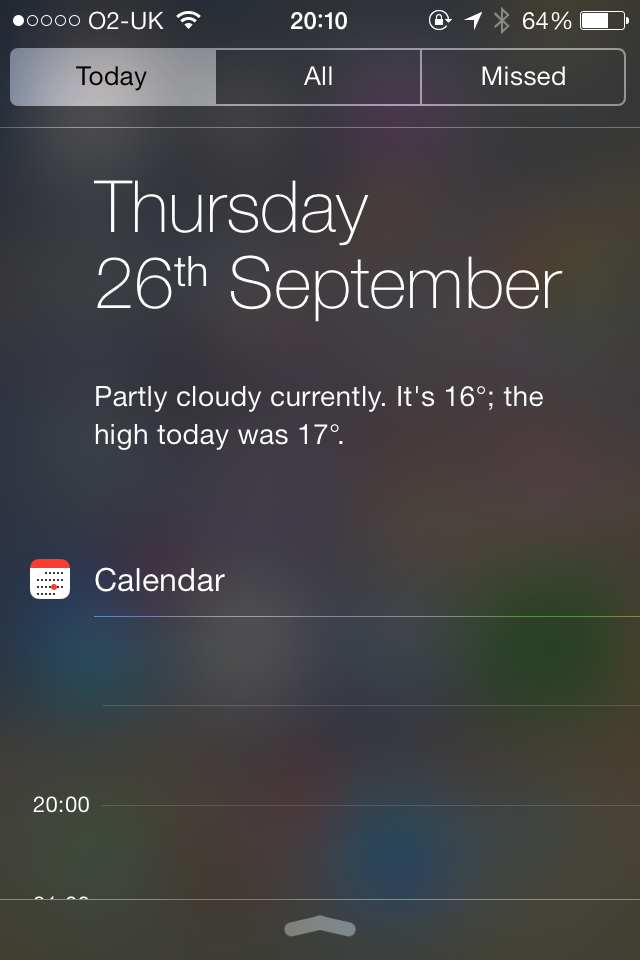
Swipe down from the top and you get the notification centre;


Swipe across to get Today view, which although doesn't give the graphic weather output, it actually gives something much more useful - that is a current weather forecast and outlook in text, which I actually use, whereas the old weather widget for me just looked pretty.

It's really good to have the calendar accessible via notification centre and the lock screen, fab. And you get a list of how many events you have tomorrow - would have been better if it listed what those events were but, it's still very good. Also would be good if you could swipe to get the whole of the day's calendar view, not just the next few hours.


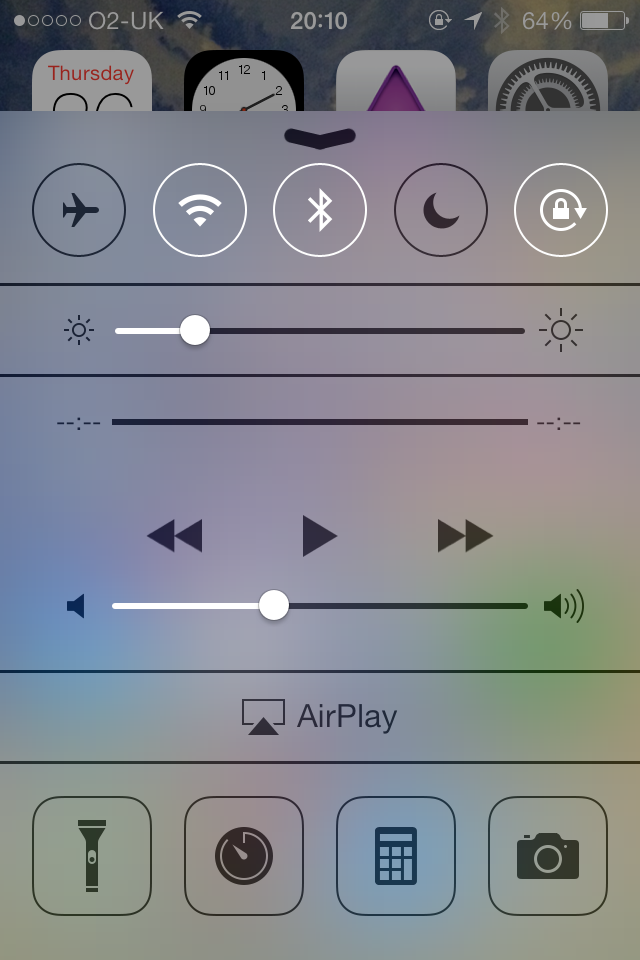
Swipe up for the control centre, this is very good - gives you control of music player, airplay, and allows you to quickly turn on/off Airplane mode, Wifi, Bluetooth, Do not Disturb, and the orientation lock. You can also control the brightness, and quickly open the flashlight, clock, calculator and camera, friggin great!


And the icing on the cake is the new multitasking view, by double clicking the home button, which brings up a window of the apps, and allows you to swipe up to close, very Touchpad/WebOS inspired, and I really like it, and it is useful, and much more fun to swap to different apps this way.


And the notification banners that appear are now much more pretty, and integrated better. Overall I'm very happy with the new iOS 7.

Getting iCloud calendar to sync with HP Touchpad

So you want to display your iCloud calendar from your iOS device on your HP Touchpad (webos).

Well there is an easy way.

In the calendar on your Mac - right click on the calendar and share the calendar / make it public, and copy the url.

Paste the url into this website;

https://icaltogcal.com

Then click continue, and copy the new share url.

Add this to your google calendar;

https://support.google.com/a/users/answer/178357?hl=en - How to add the calendar to google


Sign in to your Google Apps account in a web browser and open your GoogleCalendar.


In the left sidebar under Other Calendars, click the Add menu. Then choose one of the following:


Add by URL: Adds a team or company calendar someone created. Enter the calendar's address (ends in .ics).


Now it should process the url and add the calendar. It takes a few hours to start syncing, so it will be blank for a while, but after a few hours (I left it for 24 hours) it will start syncing.


Then on the Touchpad add your Google account to the calendar, and voila the calendar will appear on your Touchpad. 


Done.


Use of Siri in iOS 7

I'm happy with Siri, and iOS 7, what I particular like using Siri for is when I am travelling in the car and I use it mainly for i) Setting reminders; ii) Reading notifications; iii) Responding to text messages; iv) making phone calls; v) Playing music.

It comes with certain issues the main issues are;

a) Occasionally, and actually quite often I get the message "Sorry I can't take any requests right now" or "I'm currently having a problem" or something to that effect. Normally it goes away after a few seconds, today it continued for 10+ minutes, it would be good to have a way to know whether Siri is working or not.

b) When I set a reminder I can set it to remind when I arrive "at home" or "at work" but when I say at a place such as "arriving at Basildon" it doesn't understand what I'm saying and makes that part of the reminder description. The same thing happens when I set it to remind me at a time, it sometimes gets confused and includes the time as part of the task description. Now when I want it to remind me I say "remind me at 1.30pm" and then it says "what would you like me to remind you about" and then I say "remember to feed the fish" or something, and then it allows me to create the reminder at 1.30pm.

c) Notifications sometimes gets confused when I'm trying to get it to playback my voice mail. So I think saying something like call voicemail, or listen to phone voicemail does the trick most of the time.

d) Playing music doesn't seem to understand when I say an album name and artist together .e.g. "play Counting Crows" works, and "play Recovering satellites" works, but not "play counting crows recovering satellites). Also at the moment I've got a bug where playing certain music, it says "playing xxx..." but then nothing plays, which is a bit annoying.

It's getting better though, and it's really useful. Especially replying to text messages is great.

Friday, 14 September 2012

How did my iPhone predictions go?

- All your standard enhancements; faster processor, more memory, better rear facing camera (higher megapixel, faster shutter response, enhanced flash), better front facing camera -> Pretty much all this happened 1/1
- New look and redesign, judging by leaks back will be metallic and coloured black or white. Sleek unibody design? -> Yep, got that one right 2/2
- larger screen, rumours are it will be the same width but longer and have a 4-4.5 inch diagonal, I would be pleased for the size increase but if its larger and keeps the same number of pixels it won't be as good a retina display, if extra pixels are added with the increased height, then how will existing apps work, will they all have to be re-written for the new screen resolution, I guess we will here about this soon in order for us to update our apps -> Yep this happened 3/3
- Smaller dock connector, I've said this for a while, and leaked photos suggest this might be included. -> Yep my prediction finally came true... 4/4
- Movement of the earplugs port to the bottom, according to rumours -> Oh dear I predicted this right... 5/5
- NFC payments enabled (want) -> Unsurprisingly this didn't happen :-( 5/6
- 4G data connectivity -> Yep 4G/LTE happened 6/7
- 128 GB space is unlikely as the iPad hasn't got that size yet -> Nope this didn't happen either 6/8
- There are rumours it'll be called the "new iPhone", noooo! -> Thankfully they kept the numeric nomenclature, phew! 6/9

So how did I do; 6/9 correct or 67% not bad :-)

iPhone 5 iWant

So what is new on the iPhone 5?

  1. Larger screen - not sure how existing apps are going to render on the new aspect ratio? We'll see. So viewing of widescreen videos without a black bar, and an extra row of apps on the home screen.
  2. New processor - New A6 chip is meant to make the iPhone twice as fast, and for an already quick phone, this is great!
  3. 4G/LTE - Great ... but not so much as the UK doesn't have a 4G network yet, but when it does this will be great.
  4. Thinner and lighter - Always good - though I read the lightness makes it feel less solid ... 
  5. Better camera - Camera optics are enhanced, higher resolution, increased facial recognition (so better focus?) and new panoramic view which is great
  6. Better iSight camera (front facing camera) - can now take 720p FaceTime chats
  7. Larger battery - so battery life improved (but still not as good as 4 apparently, but can't be worse than 4S?)
  8. New dock connector (Lightening) - new dock connector, though it's not clear what the advantage is other than being able to plug in either way round. Unfortunately you'll now need to buy new connectors and accessories ...
  9. Moved earphone port - I think this may be a disadvantage - e.g. when you've got it rested in the cup holder in the car, we'll see...
  10. New look design - Not only is the screen bigger, but the look has been re-designed - not revolutionary, but now has a cool aluminium back panel.
  11. iOS 6 - Further Twitter & Facebook integration, new maps, new 3D fly over, new turn-by-turn directions, PassBook and enhancements to Siri (Open apps, post to Facebook, integration with Movie reviews, restaurant booking and sports scores - though these are probably US only...)
  12. New earphones (EarPods) - New redesigned earphones called "EarPods".
Though not revolutionary, and all this information had been pretty much leaked, I was not disappointed. The larger screen and increased speed are major pulls. However I am probably going to wait for the iPhone 5S, maybe I'll save my money for the new new iPad (iPad 4).

Saturday, 14 January 2012

Transferring from iPhone 3GS to 4 via Windows Guide

The last step in the puzzle was to transfer the contents of the iPhone 3GS across onto the iPhone 4S. I'll talk you through the process we went through as it may be of use to know some of the querks in the process.

Firstly get the iPhone 4 into the correct state, by going into settings and resetting back to the factory settings and deleting the content. This then puts the phone back into factory settings.

This guide assumes you are on O2 and did the sim swap. So make sure you have a full backup of the iPhone 3GS, and then put it into Airplane mode and transfer the sim from the 3GS into the 4.

Pre migration I recommended that the iTunes was updated to the latest version, which is the step that was taken, and the backup done within the new version.

Next we plugged the iPhone 4 into the laptop and requested it to be restored from the backup that we had done of the 3GS. Here is where it should have gone through fine, here is where it went a little wrong.

The progress bar was making little progress and the estimated time until completion went up from 3 hours to 15 hours to 30 hours to 48 hours, so clearly something was not correct.

Under these circumstances look at task manager and check out the memory utilisation and the processor utilisation. It was clear there was a process that was taking up nearly 100% of the cpu utilisation. We tried adjusting the priority up of this process, and the % utilisation increased, and the estimated time of completion came down. But then the iPhone reported that the install couldn't be completed as it failed to communicate with iTunes.

So something was wrong. A google for the problem, showed it was an issue with the latest iTunes utilisation of iCloud, so I was feeling terrible that I had forced the iTunes upgrade. However the worry was short, for google also listed a partial solution which on further thought gave the answer.

To resolve this, just kill the push notifications daemon process that is hogging 100% and you will fix the issue.

However we were now in a state that was a distance away from the initial conditions, and for us to restart we needed to return to that place. This was achieved by resetting the iPhone 4 back to factor settings again, restarting iTunes and the computer, and stopping the offending process.

This time round the restoring of the 4 with the contents of the 3GS began to proceed appropriately. In fact the time for completion of the initial step was reasonably quickly, under an hour. The syncing of media automatically kicked off, and this took a further couple of hours.

Once complete the phone was fantastic, some tips that were required to get the phone ready to use.

1) Setup Email, as was no longer working
2) Put in wifi key
3) Put in passwords to important apps such as facebook and twitter
4) Reorganise some of the apps with the new apps that have come in
5) Demonstration of the notifications centre
6) Demonstration of the reminders
7) Guided tour of the iPhone 4's new features was given.

Friday, 17 June 2011

The Kev's Apps website is live

Please visit the new Kev's Apps website http://www.kevsapps.co.uk to view the apps I have developed for iPhone / iPod Touch (and iPad).


- You can follow kevsapps on Twitter http://www.twitter.com/kevsapps
- You can like kevsapps on Facebook http://www.facebook.com/pages/Kevs-Apps/168565599873783
- You can view video demos of the apps on youtube http://www.youtube.com/user/kevsapps
- Or you can subscribe to the rss feed here http://www.kevsapps.co.uk/subscribe/kevs-apps.rss


Thanks